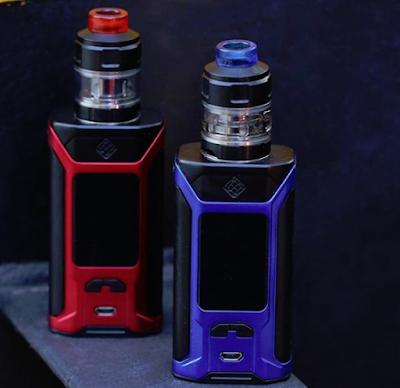
It is really a very interesting product, what I am saying is true. Wismec is equipped with two different boards on this unit, one for the straight output and the other for the adjustable output. The LUXOTIC MF BOX Mod allows users to change the boards themselves to achieve different output experiences.
Slider
Videos
Vape Kits
Deals
Vape Tanks
Vape Mods
Giveaway
New Arrive
It is really a very interesting product, what I am saying is true. Wismec is equipped with two different boards on this unit, one for the straight output and the other for the adjustable output. The LUXOTIC MF BOX Mod allows users to change the boards themselves to achieve different output experiences.
How to Use Wismec LUXOTIC MF Box Mod | User Manual
By: Taylor on 7/26/2018 / comment : 0 e-cig, E-cigarette Kit, e-cigarettes, Electronic Cigarette, electronic cigarettes, LUXOTIC MF Box Mod, vape kit, Vape Kits, Vape Mod, Wismec
LUXOTIC MF Box Overview
Squonk mode
How to use Wismec LUXOTIC MF Box Mod?
1. Remove the back cover to take out e-liquid bottle.
2. Unscrew the cap of the e-liquid bottle, and then fill the e-liquid into the bottle slowly.
Note: Please do not overfill.
3. Insert the bottle into the device again and then put one high-rate 21700 or 18650 cell (with battery sleeve) into the device.
4. The way of inserting the bottle is as follows.
You can also turn it into a common box mid with the spare parts we provide in the package.
Box Mode
How to use?
1. Please take out the e-liquid bottle and keep it well.
2. As to battery usage, you can have three alternative usage such as single 18650 cell (with a battery sleeve), single 21700 cell, double 18650 cells with the help of the connecting piece.
Note: Please be careful not to use battery with torn shell for safety.
3. Put back the back cover.
4. Install your Favorite atomizer.
Note: You must not use squonk atomizer/bottom feeding atomizer
How to replace the PCBA?
We provide two different circuit boards, one is for variable voltage output and other is for direct output.

If you are a direct output pursuer, we also provide another circuit board without screen.
1. Unscrew the 6 screws on the top and bottom on the mod and keep them carefully.
2. Remove the front cover, unscrew the 7 screws on the original circuit board.
3. You can replace the original circuit board with a new one.
4. Repeat the above steps, screw on the 7 screws, then install the front cover, and screw on the 6 screws on the mod.
Power on/off
Press the fire button 5 times in quick succession to turn on/off the device.
Vaping
Press the fire button and inhaleSwitch the mode
Press the fire button three times to enter into the mode options. Then press “+” button or “-”button to switch between VW/BP/TEMP (Ni, Ti, SS)/(M1, M2, M3). Press the fire button to confirm. Once you confirm the mode, you can press the regulatory buttons to set the parameters.
Note: The temp ss mode is only suitable for stainless steel 316 coil.
Warranty
Please consult with your WISMEC distributors for warranty policy. We are not responsible for any damage caused by user error.
This warranty is only valid for authentic WISMEC products within warranty period from date of purchase by the end user.
Warning
1. Keep out of reach of children
2. This product is not recommended for use young people, non-smokers, pregnant or breast-feeding women, persons who are allergic/sensitive to nicotine.
Contra-indication
1. Only have your product repaired for use by Wismec. Do not attempt to repair the unit by yourself as damage or personal injury may occur.
2. Do not leave the product in high temperature or damp conditions, as this may damage the product. The appropriate operation temperature is within 0℃ to 45℃ while charging and -10℃ to 60℃ while in use。
3. Keep away from water
Possible adverse effects
1. Use of this product may cause damage to health
2. For people with adverse reaction after using this product, it is recommended to use the juice with lower nicotine content or no nicotine
Wismec SINUOUS RAVAGE230 User Manual
By: Anonymous on 1/03/2018 / comment : 0 sinuous ravage230, User Manual, Vape Mod, Vaping101, Wismec

How to use:
1. Power on/off: Push forward the battery cover and put two high-rate 18650 cells into the battery body. Press the fire button 5 times in quick succession to turn the device on and off.
Note:
(1) Please adjust the wattage to a proper range to match the atomizer you used before using.
(2) Please be careful not to use battery with torn shell for safety.
2. Display on/off function: While the device is on, press the Fn button, this will turn the screen display on/off. When the display is off, regulatory buttons will not work to prevent accidental adjustments.
3. Key lock function: While the device is on, simultaneously press the two regulatory buttons. This will switch between Key Lock and Key Unlock function.
4. Micro USB port function: The USB port can be used for charging and upgrading firmware. It is better to take out the cells and charge them through external charger.
5. Switch the display mode: By pressing the left and right regulatory buttons simultaneously in shutdown state, the screen display will rotate 180 degrees. You can then view the screen from two kinds of angle through this operation.
General Settings:
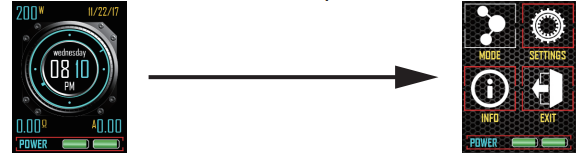
1. When the device is on, press the fire button 3 times in quick succession to enter the main menu.

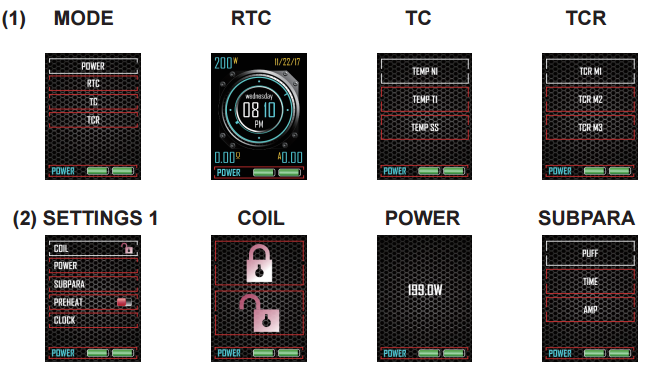
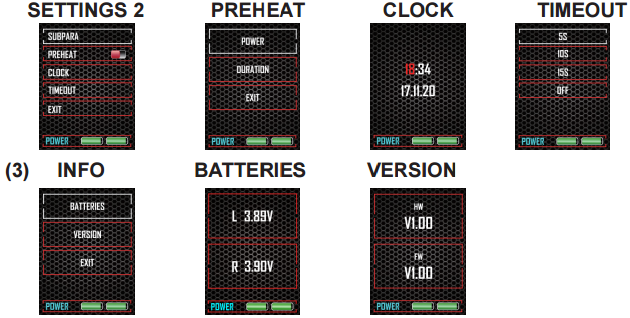
2. Press the left or right regulatory button once repeatedly to shift among (1) MODE, (2) SETTINGS and (3) INFO. Press the fire button to confirm. Under their sub-menus, you can choose vaping mode, set parameters, turn on/off certain functions and so on in the same way (press the left or right regulatory button to adjust and press the fire button to confirm).
3. After settings are complete, just move the EXIT or press the Fn button to go back to the main interface.


Supplementary Instructions:
Parameter Settings: Under VW mode, the wattage can be adjusted by pressing the regulatory buttons, right to increase and left to decrease; Under TC/TCR mode, the temperature can be adjusted by pressing the regulatory buttons, right to increase and left to decrease.
Note:
1. The TC-SS mode is suitable to SS316 coil.
2. When using normal coil or the resistance of coil you used is higher than 1.5ohm in TC modes, the device will automatically switch to POWER mode.
3. When Kanthal coil is applied under TC/TCR mode, the device will also automatically switch to POWER mode.
Sub-parameters: Under SUBPARA menu, PUFF (total vaping puffs), TIME (total vaping seconds) and AMP (current amp) are included. You can choose one of them to be displayed on the main interface.
Clock Setting: Under SETTINGS-CLOCK menu, you can set the time and date by pressing the right regulatory button to move and left right regulatory button to adjust.
Note:
1. When the device is on, you can select the RTC mode under MODE-RTC menu. And you can check the time on the main interface.
2. When the device is powered off, you can check the time and date by pressing the fire button one time.
Preheat Function: Preheat function allows the device to quickly heat up the coil at a higher wattage with certain time limit. This function only works under VW mode.
Timeout Duration: Once the duration is set (like 5 seconds), when you hold the fire button and vape over the pre-set time, it’ll display “OVER 5S PROTECT” and shut down automatically. Press the fire button 5 times to restart.
About TCR Mode: In TCR (Temperature Coefficient of Resistance) mode, users can set the parameters according to the TCR of coil.
Following is the TCR value range for your reference:

1. The TCR value in the sheet is 105 multiplied of the actual TCR.
2. The TCR value range is 1-1000.
Malfunction Indication and Protection:
No Atomizer Alert: When the device does not detect an atomizer, the OLED screen will display “NO ATOMIZER FOUND”.
Atomizer Low Alert: When the resistance of atomizer is lower than 0.1ohm in VW mode or lower than 0.05ohm in TC modes, the OLED screen will display “ATOMIZER LOW”.
Atomizer Short-circuit Protection: When atomizer short-circuit occurs, the OLED Screen will display “ATOMIZER SHORT”.
Temperature Alert: If the internal temperature of the device is over 70°C, the output will shut off automatically and the screen will display “DEVICE TOO HOT”.
Temperature Protection: In TC modes, if the actual temperature of coil reaches the set temperature, the device shows “TEMP PROTECT”.
Weak Battery Alert: In VW/TC mode, when the device installed with an atomizer is working and the voltage of battery is below 2.9V, the device shows “WEAK BATTERY”. Meanwhile, the output power will be reduced accordingly.
Low-voltage Protection: When the voltage of the battery is below 3.3V, the screen will first display “BATTERY LOW” and then “BATTERY LOW LOCK”. Charge the battery to unlock the device.
Imbalanced Alert: When the difference between the maximum and minimum cell voltage is equal or greater than 0.3V, the OLED screen will display “IMBALANCED BATTERIES” after inserting the USB cable. Then please take out the cells to charge or replace with freshly charged cells.
Check USB Alert: When the voltage of the USB charger is equal or greater than 5.8V, the OLED screen will display “CHECK USB ADAPTER” after inserting the USB cable or vaping.
Charge Error Alert: When no current is detected in charging state, the OLED screen will display “CHARGE ERROR”.
Check Battery Alert: When one of the cells is not installed correctly, the OLED screen will display “CHECK BATTERY”.
Two Powerful Vapes: SMOK S-Priv VS WISMEC SINUOUS RAVAGE230
By: Anonymous on 12/14/2017 / comment : 0 Ecigs, Electronic Cigarette, S-Priv, Smok, Starter Kits, Vape, Vape Kits, vape life, Vape News, vaper, vapers, Vaping, Wismec, Wismec Sinuous Ravage230, Wismec Sinuous Ravage230 Kit

Similarities
Both SMOK S-Priv and WISMEC SINUOUS RAVAGE230 are powered by dual 18650 cells so that the power is great enough. S-Priv can fire up to 225W while SINUOUS RAVAGE230 can be up to 200W. For vapor chasers, these two devices can definitely satisfy your needs. Besides, these two devices feature large display screens for you to get some information in a clear and concise way. By using this design, even beginners can know how to handle the e-cigars properly.

Differences
As the saying goes, there are two leaves in the world. These two e-cigars also have their own distinctive features. For c, the most unique thing is about its appearance. It is designed to be a skull with a big hat on the mod. And eyes of the skull can shine 12 different colors. Moreover, the device can use three different modes so that you can choose one mode based on your need. Regarding WISMEC SINUOUS RAVAGE230, it has a large 1.45 inch display screen and it has a childproof lock system to avoid potential risks happening to those naughty kids.
Conclusion
SMOK S-Priv and WISMEC SINUOUS RAVAGE230 have some common points and their own distinctive features. Hoping that after knowing about some detailed information about these two, you can get some useful suggestions.
Wismec SINUOUS RAVAGE230-Needn’t Worry About The Naughty Boys
By: cloumix.tech on 12/12/2017 / comment : 0 childproof lock system, Function, Safe, Vape Kits, Vape News, vaper, Vaping, Wismec, Wismec Sinuous Ravage230 Kit
Vapes takes this into their account. If one of the parents is a vaper, their e-cigarettes that is easy to be initiated by one button press may happen to one of the potential hazard for the safety of our children. Suppose if your kids accidentally touches the button and the e-cigarette is on work, it may cause them to be hurt.
Needn't worry, this time Wismec, in consideration for those parents vapers, designed a new vape-Wismec SINUOUS RAVAGE230 kit. Why I speak so highly of it? Let's see one of its spotlight. You may feel regretful to order one.

It is the one of the few vapes with such functions. If you want to make sure that the e-cigarettes are safe to your child, this one is a must.
Wismec SINUOUS RAVAGE230 Open Box Review -Powerful and Super-cool
By: cloumix.tech on 12/12/2017 / comment : 0 New Arrive, Open Box Review, RAVAGE230, Review, SINUOUS, Vape, Vape Kits, Wismec, Wismec Sinuous Ravage230
Why can I speak so highly of it? What's the differences comparing with other vapes that are released recently. It adopts the traditional package of Wismec, all black with a sketch of the mod and the name of it on the front package. Nothing different from the previous ones. When opening the box, I can see all the parts including the mod, atomizer, coils all neatly lie in their places.

The Wismec SINUOUS RAVAGE230 is so exquisitely designed with a shield-like design on the front body where you can also find the 1.45 inch large display screen. Every color of it is fashionable enough. By holding it in your hand, it surely makes you look cool. Apart from the super cool design, it is still worth mentioning the high watt of it, also favored by cloud chaster. Although comparing with those powered by triple batteries with a high watt of 300W, this one is not so powerful since it is only powered by dual batteries and can output 230W, also a rather high output. What's more, it is also compact comparing with those triple batteries and more convenient for you to carry around.
Popular Post
-
Hey Friends, Geekvape Sonder Q3 Kit has been launched newly by Geekvape. If you wanna update your device recently, I believe it will meet...
-
Hey Friends, Vaporesso LUXE X2 Kit has been launched newly by Vaporesso. If you wanna update your device recently, I believe it will meet...


Comments